


Droppath Route Planner
4.354.00 Reviews
App Specs
- Version
- 4.1
- Updated On
- License
- Free
- Downloads
- 50,000+
- Developer
- Technologies Suzero
- Categories
- Maps & Navigation
- Platform
- Android
Screenshots
 Analysis by AppCompare
Have you ever found yourself juggling multiple delivery stops and feeling like you're playing a game of logistical Tetris? Enter Droppath Route Planner, the app that promises to turn your chaotic delivery day into a seamless journey. Let's dive into what makes this app tick and whether it lives up to the hype.
Where a route planner earns its place
A multi-stop planner is most useful when the challenge is not finding one destination but deciding how to handle a whole list of them. I would consider this kind of workflow for a courier, a small business making local drop-offs, or anyone combining errands across town. If you only need directions to one place, a standard maps app is usually simpler; Droppath’s purpose is to help organize several stops before the driving begins.
Picture a delivery day with addresses gathered from messages, a spreadsheet, and handwritten notes. The practical value is having one planned route instead of repeatedly switching between separate directions and trying to remember the next destination. I’d still check the address list before setting off: a route can only be as useful as the locations entered, and a mistaken apartment number or incomplete street address can send a driver into avoidable backtracking.
That makes the app a better fit for people who regularly handle batches of stops than for someone planning an occasional sightseeing trip. Travelers who mainly want broad points of interest, public transport options, or turn-by-turn guidance for a single destination may prefer their usual navigation app. Droppath is most compelling when stop order and delivery organization are the actual problem to solve.
Getting Started with Droppath
First things first, Droppath Route Planner is available for both Android and iOS, making it accessible to pretty much anyone with a smartphone. Setting it up is a breeze. After downloading, the app quickly guides you through the setup process, ensuring you’re not stuck fiddling with settings when you should be on the road.
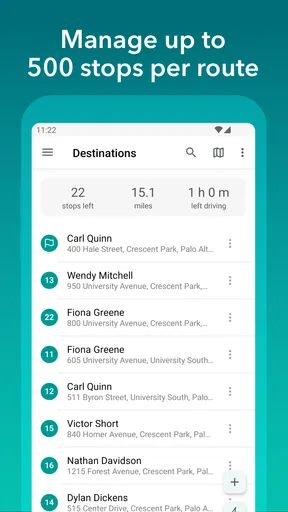
The app's user interface is quite intuitive. You’re greeted with a clean and simple dashboard, which makes adding multiple stops as easy as pie. Just enter the addresses, and Droppath takes it from there, plotting the most efficient route for you.
Features That Stand Out
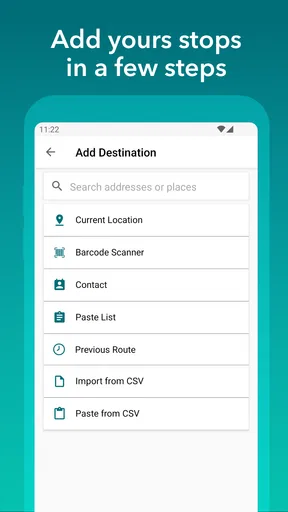
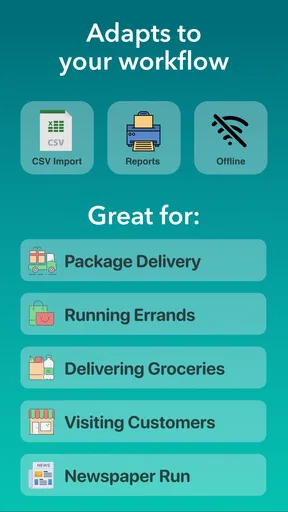
One of the coolest features is the ability to import addresses from Excel or a CSV file. This is a huge time-saver if you’ve got a long list of stops. Plus, the app supports manual entry, voice input, and even scanning barcodes to add locations. It’s clear the developers have thought about versatility.
Worth Reading Before You Choose

EA SPORTS FC Mobile 26 Is a Bigger Football Game, but It Takes Time

Flipboard Shows What News Apps Must Do Beyond the Feed

Switching to Android Auto Means Rethinking Your Driving Routine

Google Calendar Makes a Crowded Week Easier to Manage

Ludo King Makes the Most of the Minutes Between Plans

Baby Panda World Brings Quick Play to Modern Phones, but Its Game Library Feels Busy
For a useful routine, I’d treat an imported list as a starting point rather than something to trust without review. Clean up duplicate entries, check that each address is complete, and keep any delivery-specific notes alongside your own workflow so you can verify the right stop before moving on. This kind of preparation matters most when the list comes from several sources and the day has little slack.
Real-time traffic updates are another highlight. We all know how unpredictable traffic can be, and Droppath keeps you in the loop, offering alternative routes if things get too congested. This feature alone can save you a ton of time and headaches.
There is a useful trade-off here: traffic can affect the time it takes to reach a stop, but it does not remove the need to make sensible delivery decisions. A driver may have opening hours, priority parcels, or a customer waiting, so the mathematically tidy order is not always the right order for that day. I’d use the optimized sequence as a strong baseline, then adjust it when a real-world constraint matters more than shaving distance.
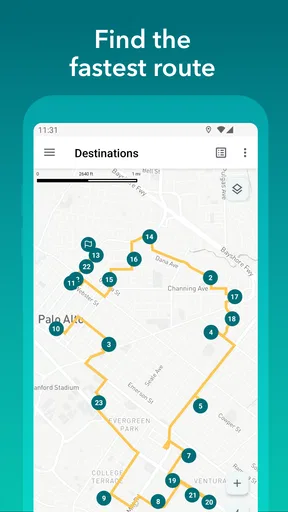
Another handy tool is the ability to optimize your route with one click. No more puzzling over which stop to hit first; the app does it for you, maximizing your efficiency and minimizing drive time. Trust me, when you’re on a tight schedule, this is a game changer.
From a prepared list to a real driving day
On a typical workday, I’d put the addresses together before leaving, optimize the sequence, and take a quick look for anything that seems out of place. If a customer calls with a change, I’d reassess the plan rather than assume the original order still makes sense. The biggest everyday benefit is reducing the mental load of choosing the next stop repeatedly, not eliminating every decision from the route.
For a small operation, that distinction is important. A route planner can help an individual driver make a busy list manageable, but it is not automatically a full dispatch or fleet-management system. Someone coordinating several drivers, tracking job completion across a team, or managing complex service windows should check whether a dedicated business platform better fits those needs. I’d choose Droppath for organizing my own multi-stop run, not assume it replaces every operational tool a company may need.
Using Droppath on the Go
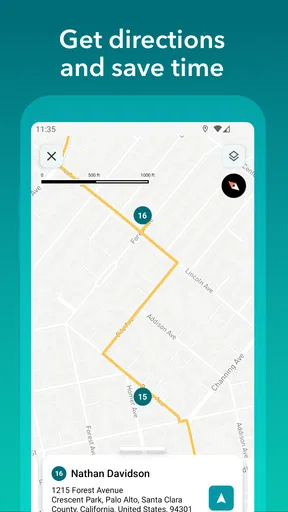
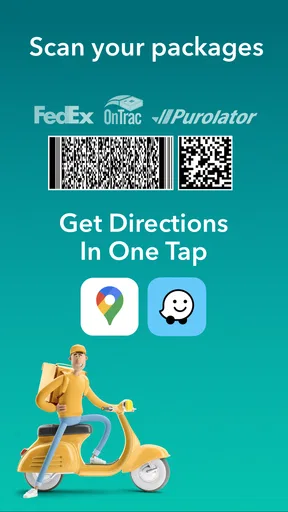
Once you hit the road, Droppath continues to impress. The step-by-step navigation is clear and concise, and it integrates smoothly with Google Maps or other navigation apps you prefer. This means you’re not stuck with just one option and can choose the interface you’re most comfortable with.
That separation between planning and navigation is practical: I can organize the stop order in a route tool, then rely on a navigation app I already know for the drive itself. It also means the route planner and the navigation app are separate parts of the workflow, so I would pay attention when handing off to make sure the selected destination is the next stop I intend to visit. For someone who values a familiar navigation interface, that flexibility is more appealing than being locked into a new one.
The app also offers offline capabilities, which is a lifesaver if you find yourself in areas with spotty internet. Just make sure to download your routes beforehand. It’s like keeping a trusty map in your glovebox, just in digital form.
Offline preparation is worth making part of the departure checklist, especially if the route crosses areas where reception may be unreliable. I’d open the planned route while connected and confirm that the key locations are present before setting off. That small habit is more dependable than waiting until a weak signal appears to find out whether the route is ready to use.
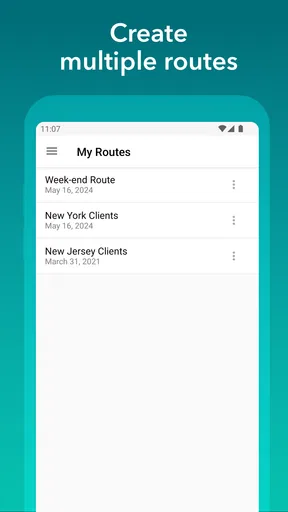
Plus, if you’re someone who loves to keep track of your delivery history, Droppath has got you covered. It logs all your past routes, making it easy to review them later or use them as templates for future trips.
Past routes can be a helpful reference when the same neighborhoods or delivery patterns come around again, but I would still review a saved route before reusing it. Addresses, road conditions, and the day’s priorities can change; a previous sequence is a convenient starting point, not a guarantee that it remains optimal. That makes route history most useful for repeat work that is similar, rather than identical.
What to expect from the current version
Droppath is developed by Technologies Suzero, and its current version is 4.0.1. It first appeared on October 12, 2020, so it has had time to develop beyond a brand-new release. Those facts tell me where the app stands today, but they do not by themselves prove which individual features changed between versions. Existing users should judge the current experience by whether it continues to fit their route routine, rather than assume that a version number guarantees a particular improvement.
The app is free to download, with in-app purchases ranging from $4.99 to $129.99 per item. I’d look at the purchase details in the app before building a work process around any paid capability, especially if the app will be used regularly for a business. A casual user can begin without paying upfront, while a frequent driver should decide whether any optional purchase solves a real need rather than treating it as essential by default.
Its audience rating is Everyone. It has a 4.3 average from around 336 ratings, and more than 10,000 installs. Those figures suggest that people are using it for practical route planning, though ratings cannot tell me whether its specific workflow will suit a driver’s address sources, delivery rules, or preferred navigation habits. I’d try it with a normal route before depending on it for a demanding day.
Limits worth weighing before relying on it
The main limitation is that route optimization cannot understand every human priority unless the user accounts for it. A short route may not be the best route when one stop has a firm deadline, a recipient needs extra time, or a delivery has to be handled first. I’d keep those constraints visible and treat the suggested order as a planning aid, not an instruction that overrides judgment.
There is also a setup cost when a route list is messy. Importing a file can save repeated typing, but it does not make inconsistent source data disappear. If addresses use different formats or contain duplicates, taking a few minutes to inspect them can prevent a much longer detour later. For a handful of stops, manual entry into a familiar maps app may be quicker; the advantage becomes clearer when organizing a larger batch is a recurring task.
If you are deciding whether to keep it, the key question is how often you plan multi-stop trips. Regular delivery drivers and people who repeat local routes are the clearest audience. Someone who wants only one-off directions, detailed team dispatch, or a route shaped around many special constraints may be better served by a conventional navigation app or a more specialized business tool.
Final Thoughts
So, what’s the verdict? Droppath Route Planner is a robust tool that delivers on its promises. It’s packed with features that cater to both novices and seasoned delivery drivers alike. The seamless integration with other apps, real-time updates, and the ability to handle multiple entry methods make it a standout in the crowded market of route planning apps.
If you’re looking for an app that can transform your delivery process from chaotic to calm, Droppath is definitely worth a try. Whether you’re managing a fleet or just tackling your own delivery route, this app has the potential to become your go-to digital co-pilot.
So, next time you’re staring down a long list of addresses, remember that Droppath has your back. Happy routing!
My recommendation is to test it with a familiar route first: compare the proposed order with the way you would normally handle those stops, and see whether importing, navigation handoff, and route history fit your habits. If they do, Droppath can make repeat delivery planning feel more orderly. If your needs are mostly single-destination directions or complex team coordination, another kind of tool will likely feel more natural.
Pros
- Efficient route optimization for multiple stops.
- User-friendly interface with intuitive design.
- Real-time traffic updates enhance accuracy.
- Supports import from Excel for convenience.
- Customizable stops and notes for each client.
Cons
- Limited offline functionality can be inconvenient.
- Subscription required for advanced features.
- Occasional lag with large data sets.
- No integration with all GPS apps.
- Limited language support outside English.
FAQs for Droppath Route Planner
What is Droppath Route Planner used for?
Droppath Route Planner is designed to help delivery drivers and logistics professionals optimize their routes. By efficiently mapping out stops, the app reduces travel time and fuel costs, and ensures timely deliveries. It's particularly useful for businesses needing to manage multiple deliveries daily.
Is Droppath Route Planner available on both Android and iOS?
Yes, Droppath Route Planner is available for download on both Android and iOS devices. Users can find it on the Google Play Store and Apple App Store, ensuring compatibility with a wide range of smartphones and tablets.
Does Droppath Route Planner require a subscription?
Droppath Route Planner offers both free and premium features. While basic route planning is available for free, advanced features such as unlimited stops, real-time traffic updates, and additional customization options may require a subscription.
How user-friendly is Droppath Route Planner?
Droppath Route Planner is designed with an intuitive interface, making it user-friendly even for those with minimal technical experience. The app features drag-and-drop functionality, clear visual maps, and easy access to key features, which simplifies the process of route planning.
Can I customize routes in Droppath Route Planner?
Yes, Droppath Route Planner allows extensive customization of routes. Users can add notes to stops, set priorities, and even adjust routes based on specific delivery windows or traffic conditions, providing flexibility to meet various logistical needs.


